- Home Page /
- Mobile Phone Accessories /
- Accessories /
- Stylus Pens /
- Stylus Pen for Surface Pro 111098X, Surface LaptopBookG...
0 ratings

Item #:
85369142
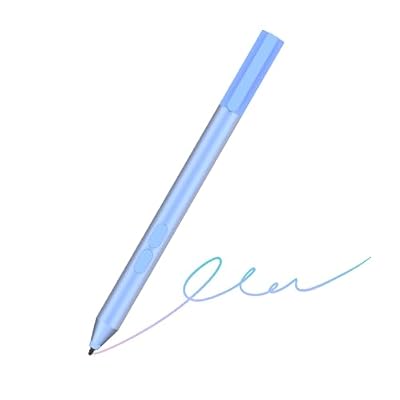
Stylus Pen for Surface Pro 111098X, Surface LaptopBookGoStudio, Kobo | Palm Rejection, 1024 Pressure, 2500H Battery Life Active Pencil for Student
Item #:
85369142
INR 3390
Price Details
Price
INR 3390
M.R.P. INR 3390
Excluding Shipping & Custom charges ( Shipping and custom charges will be calculated on checkout )
*All items will import from US
0 ratings
Write a review
In stock
 Imported from USA store
QTY:
Order now and get it around Friday, July 31
Secured transaction
Ubuy works hard to protect your security and privacy. Our advanced payment security system ensures confidentiality by encrypting your information during transmission using AES (Advanced Encryption Standards) and SSL (Secure Socket Layer) protocols. Your payment details are 100% secure as we do not share your payment details with third party sellers.
Our Top Logistics Partners


Transform your Surface device into a powerful creative tool with the iafer Surface Pen – where affordability meets high performance.

Fast
Shipping

Free
Return*

Secure Packaging

100% Original Products

PCI DSS Compliance

ISO 27001 Certified


Ships from Ubuy, Sold by:
UBNA Distribution LLC
Note: Step Down Voltage Transformer required for using electronics products of US store (110-120). Recommended power converters Buy Now.


What Stands Out
Precision Control
With 1024 levels of pressure sensitivity, this stylus provides accurate input, allowing artists and professionals to create detailed work effortlessly on any Surface device.
Extended Battery Life
Offering up to 2500 hours of continuous usage, this stylus minimizes interruptions, ensuring users can focus on their creative tasks without frequent recharging.
Palm Rejection Technology
Designed to enhance user experience, the palm rejection feature allows for comfortable writing and drawing without accidental touches, making it ideal for both casual users and professionals.
Product Details
| Item Weight | 0.1 lbs (50 grams) |
Dangerous Goods
To avoid the delay in customs clearance process for Dangerous Goods, the shipment shall be opened at our warehouse facility to check the severity of hazardous components. Please see the list of Dangerous goods here.
Who Should Buy?

-
Artists and Designers
Ideal for professionals who need precision and sensitivity for drawing and graphic design tasks.
-
Students and Note-Takers
Perfect for students who prefer handwritten notes and require palm rejection for comfortable writing.
-
Office Workers
Useful for business professionals who often annotate documents or create presentations using Surface devices.

-
Casual Users
Not suitable for those who only use their device for basic tasks like browsing and email.
Product Description
Stylus Pen for Surface Pro 111098X, Surface LaptopBookGoStudio, Kobo | Palm Rejection, 1024 Pressure, 2500H Battery Life Active Pencil for Student Note-Taking & Artist Business Drawing
Have any Query? Chat with us
Customer Questions & Answers
-
Question:
What devices are compatible with the Pen Stylus for Surface?
Answer: The Pen Stylus is specifically designed for use with the Surface Pro 3, Surface Go, and Surface Laptop Studio, among others. This compatibility ensures that you can leverage features like palm rejection, which allows for comfortable writing and drawing without accidental touches. Perfect for artists, students, and professionals, it enhances productivity whether you are sketching a design, taking notes in a lecture, or annotating documents. -
Question:
What is palm rejection, and why is it important?
Answer: Palm rejection technology is a feature that allows the stylus to distinguish between your hand touching the screen and the stylus input. This is crucial for a seamless writing or drawing experience, as it prevents unintentional marks when your hand rests on the display. Artists and note-takers will appreciate this functionality, as it enables more natural hand placement while engaging with digital content. -
Question:
How does the pressure sensitivity work on this stylus?
Answer: The Pen Stylus offers 1024 levels of pressure sensitivity, meaning it can detect varying degrees of pressure when drawing or writing. This feature allows for more intricate and nuanced lines, making it ideal for graphic design, digital art, and detailed note-taking. Artists can create dynamic strokes, while students can vary their writing style to emphasize certain points, creating a more engaging experience. -
Question:
Can this stylus be used for drawing and design?
Answer: Absolutely! The Pen Stylus is an excellent tool for drawing and design work. Its high-pressure sensitivity combined with palm rejection makes it suitable for artists who want precision and control. Whether you’re sketching, painting, or drafting designs, this stylus offers the responsiveness needed for creative projects, allowing for fluid and expressive strokes. -
Question:
How long does the battery last on the Pen Stylus?
Answer: The Pen Stylus boasts an impressive battery life of approximately 2500 hours, ensuring that you can rely on it for extended periods without frequent recharging. This longevity is particularly advantageous for students and professionals who need a dependable device for note-taking or artistic pursuits throughout the day without interruption. -
Question:
Is the Pen Stylus easy to handle for lengthy writing sessions?
Answer: Yes, the ergonomic design of the Pen Stylus makes it comfortable to hold for long writing or drawing sessions. Its lightweight construction ensures minimal fatigue, allowing you to focus on your tasks without discomfort. This makes it a great tool for students in lectures, professionals completing long reports, or anyone who prefers digital writing and sketching. -
Question:
Does the stylus have customizable buttons?
Answer: The Pen Stylus includes customizable buttons that can be configured to perform specific functions, such as erasing or switching tools. This customization enhances productivity by allowing users to execute commands quickly without needing to touch the screen or keyboard. This feature is especially useful for artists and designers who rely on quick tool switches while working on their projects. -
Question:
How do I connect the Pen Stylus to my Surface device?
Answer: Connecting the Pen Stylus to your Surface device is straightforward. Typically, it uses Bluetooth technology for a seamless connection. Once activated, ensure Bluetooth is enabled on your device, and follow the pairing process outlined in your device’s settings. This quick setup allows you to start using the stylus effortlessly for drawing, taking notes, or navigating your device. -
Question:
What types of applications can I use the Pen Stylus with?
Answer: The Pen Stylus is compatible with a wide range of applications, including drawing and design software like Adobe Illustrator, Sketchbook, and Microsoft OneNote. This versatility makes it an excellent addition to your toolkit, whether you’re creating digital artwork, jotting down ideas, or collaborating on projects. Explore the app store on your Surface device to find additional applications that leverage stylus input. -
Question:
Where can I buy Pen Stylus for Surface Pro 111098X776543Surface 3, Surface Go 4321, Surface LaptopStudioBook 54321?
Answer: You can purchase the Pen Stylus for Surface from Ubuy. Ubuy offers an extensive selection of tech accessories, including this stylus, ensuring that you have access to reliable options for enhancing your device's usability. Simply visit Ubuy’s website, and search for the stylus model to find it easily.
iafer Stylus Pens Editorial Review
No editorial reviews found
Customer Reviews & Ratings
1 customers ratings
-
5 Star
100%
-
4 Star
0%
-
3 Star
0%
-
2 Star
0%
-
1 Star
0%
Review this product
Share your thoughts with other customers
Platform Trust & Buyer Confidence

PK
Purchase
Verified buyer
“logistcs is very good”
13 June 2026 · via Trustpilot
AN
Akhil
Verified buyer
“Very good and seamless experience, delivery package came in very good condition”
12 June 2026 · via Trustpilot
DK
Dr Kumarasway
Verified buyer
“Heavy import cost and DHL's high delivery fees.”
9 June 2026 · via Trustpilot
JM
J Mama
Verified buyer
“Interesting book and the seller describe it thank you”
8 June 2026 · via Trustpilot
PC
Paritosh
Verified buyer
“Excellent quality and a perfect fit. Description and measurements provided are to the point. Keep them coming more 🤟🏻”
8 June 2026 · via Trustpilot
Secure Checkout
Global Delivery
Easy Returns
Genuine Products
Product Price History
Important information
- Limitations : For products shipped internationally, please note that any manufacturer warranty may not be valid; manufacturer service options may not be available; product manuals, instructions, and safety warnings may not be in destination country languages; the products (and accompanying materials) may not be designed in accordance with destination country standards, specifications, and labeling requirements; and the products may not conform to destination country voltage and other electrical standards (requiring use of an adapter or converter if appropriate). The recipient is responsible for assuring that the product can be lawfully imported to the destination country. When ordering from Ubuy or its affiliates, the recipient is the importer of record and must comply with all laws and regulations of the destination country.
- Not all the products listed on Ubuy are for sale, as Ubuy is a global search engine. Products are subject to export/trade regulations.
INR 3390
Order now and get it around Friday, July 31
This item is not restrict in my country.(Please click on above link if this item is not restrict in your country, So our team will review and allow.)
QTY:
Secured transaction
PCI DSS compliant and ISO 27001:2022 certified, with encrypted payments and full buyer protection on every order.
Our Top Logistics Partners
Fastest cross-border delivery
Features & Benefits
- Compatible with a wide range of Surface devices including Pro, Go, and Laptop models.
- Offers 2500 hours of battery life on a single AAAA battery with low power consumption.
- Features 1024 levels of pressure sensitivity and palm rejection for seamless writing.
- Includes replaceable pen tips, eraser, and right-click functionality.
- Perfect for note-taking, doodling, and creative work without damaging your screen.
- 1-year after-sales service and 30-day free return & replacement policy.
Ubuy Assurance
Experience worry-free shopping with 100% original products, PCI DSS-compliant payment security, ISO 27001-certified data protection, the fastest cross-border delivery, free returns *, and secure packaging on every order.