- Home Page /
- Video Games /
- PC /
- Accessories /
- Controllers /
- Joysticks /
- Arcade Game Controller Button Microswitch 8 W...
0 ratings









Item #:
19613098
Arcade Game Controller Button Microswitch 8 Way Joystick Zero Delay USB Encoder Cable Stick DIY Kit for PC MAME Retropie Raspberry Pi
Item #:
19613098
INR 3972
Price Details
Price
INR 3972
M.R.P. INR 3972
Excluding Shipping & Custom charges ( Shipping and custom charges will be calculated on checkout )
*All items will import from US
In stock
 Imported from USA store
QTY:
Order now and get it around Sunday, June 28
Secured transaction
Ubuy works hard to protect your security and privacy. Our advanced payment security system ensures confidentiality by encrypting your information during transmission using AES (Advanced Encryption Standards) and SSL (Secure Socket Layer) protocols. Your payment details are 100% secure as we do not share your payment details with third party sellers.
Our Top Logistics Partners


Broad compatibility. Suitable for Windows, MAME, Retro, Raspberry Pi 2/3/4; even MAC.


What Stands Out
Zero Delay Technology
Experience instantaneous response times with the zero delay USB encoder, ensuring precise movements in your arcade games without lag, enhancing gameplay enjoyment and competitiveness.
DIY Customization Kit
Tailor your gaming setup with this comprehensive kit, allowing for personalized installations and adaptations to suit individual preferences, making it perfect for enthusiasts and DIY gamers.
Broad Compatibility
Compatible with a variety of platforms, including PC, MAME, Retropie, and Raspberry Pi, this joystick kit offers versatility for retro gaming, ensuring seamless integration and enjoyment across multiple devices.
Product Details
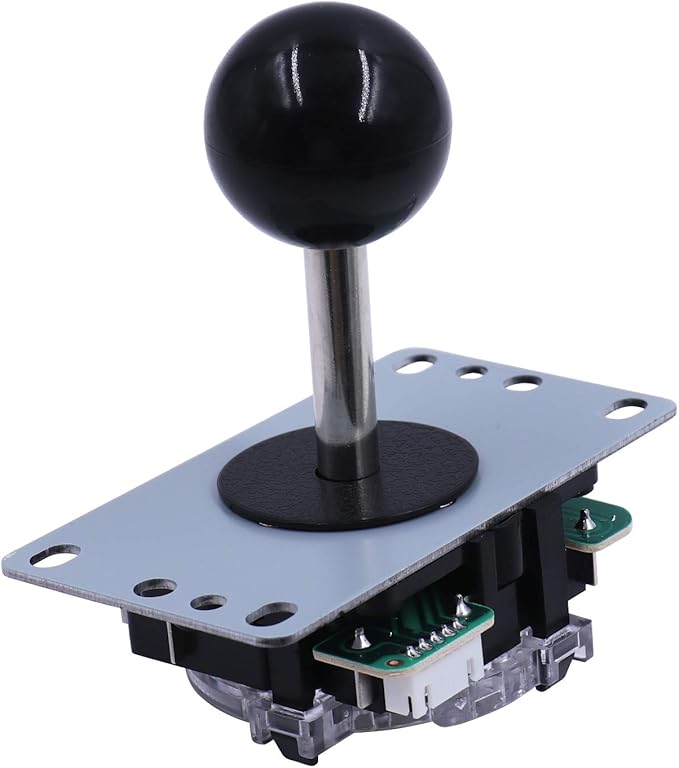
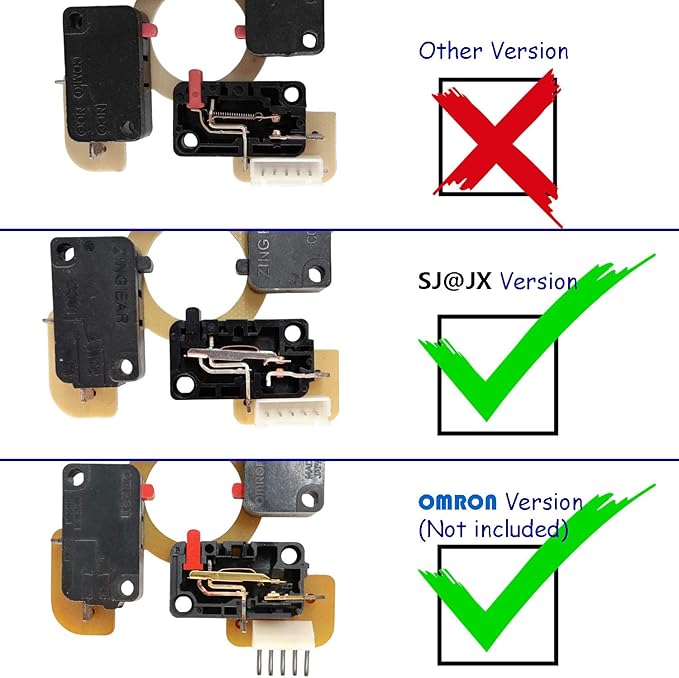
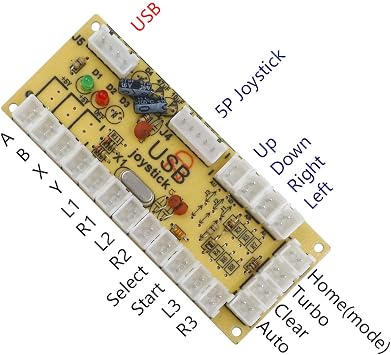
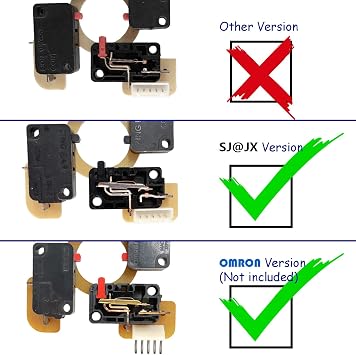
- SJ@JX Zero delay classic USB encoder, excellent compatibility.
- SJ@JX joystick, classic toggle feeling. SANWA(Not original, Same size)-style
- Button micro switch that can be cycled 500,000 times. SANWA(Not original, Same size)-style
- Easy Installation Design! Just connected the push button and joystick.
- Broad compatibility. Suitable for Windows, MAME, Retro, Raspberry Pi 2/3/4; even MAC.
| Compatible Devices | Mac, PC, Windows |
| Controller Type | Joystick |
| Connectivity Technology | USB |
| Additional Features | Easy Installation, Durable Buttons |
| Button Quantity | 10 |
| Hardware Platform | Desktop, PC/Mac/Linux/Unix, pc |
| Power Source | Corded Electric,Usb Cable |
| Item Weight | 0.39 Kilograms |
| Package Quantity | 1 |
| Brand Name | SJ@JX |
| Manufacturer | SJ@JX |
| UPC | 785197310438 |
| Manufacturer Part Number | 822a |
| Color | Black |
| Brand | SJ@JX |
Who Should Buy?

-
DIY Enthusiasts
Ideal for users who enjoy building their own arcade setups using customizable components for tailored gaming experiences.
-
Retro Gamers
Perfect for players looking to emulate classic arcade games on PC or Raspberry Pi with an authentic joystick feel.
-
MAME Users
Designed for MAME users who want to recreate arcade experiences at home with minimal setup hassle due to zero delay.

-
Casual Gamers
Not suited for casual gamers seeking quick and easy plug-and-play solutions without DIY involvement.
-
Non-Technical Users
May frustrate non-technical users who lack experience with assembling components or configuring systems for intended use.
-
Mobile Gamers
Inappropriate for players who primarily game on mobile devices and do not require desktop arcade-style controls.
Product Description
Have any Query? Chat with us
Customer Questions & Answers
-
Question:
What is included in the Arcade Game Controller Button Microswitch DIY Kit?
Answer: The kit includes an 8-way joystick, microswitch buttons, a zero-delay USB encoder, and all necessary cables for connections. This comprehensive setup allows users to create their custom arcade controllers, perfect for retro gaming enthusiasts. The joystick's microswitch provides responsive feedback, while the USB encoder ensures compatibility with multiple platforms like PC and Raspberry Pi. For example, you can use this kit to build a retro gaming console that runs MAME or access arcade games on your Raspberry Pi. -
Question:
Is this Arcade Game Controller compatible with MAME?
Answer: Yes, the Arcade Game Controller Button Microswitch DIY Kit is fully compatible with MAME (Multiple Arcade Machine Emulator). The zero-delay USB encoder allows for seamless integration with your PC, enabling you to play classic arcade games with a responsive joystick and button setup. Setting this up enhances your gaming experience, making it feel like playing on an authentic arcade machine. For instance, once connected, you can easily configure the inputs in MAME's settings to match your controller setup. -
Question:
Can I use this joystick with Raspberry Pi?
Answer: Absolutely! This kit is designed to work perfectly with Raspberry Pi, allowing you to turn your device into a retro gaming powerhouse. The zero-delay USB encoder ensures that the joystick and buttons respond quickly, providing a smooth gaming experience. Many users find this setup ideal for running gaming emulators like RetroPie, giving access to a vast library of classic games. You can create a custom arcade cabinet or a compact controller for your Raspberry Pi gaming projects. -
Question:
Do I need any additional tools to assemble the DIY kit?
Answer: While the Arcade Game Controller Button Microswitch DIY Kit includes all necessary components for assembling your arcade controller, you may need basic tools like a screwdriver for mounting and wiring. The assembly process is straightforward, making it accessible for both seasoned builders and beginners. You can refer to online guides or communities for tips to customize your controller further, such as adjusting the layout or physical design based on your preferences. -
Question:
What systems can I connect this arcade controller to?
Answer: This arcade controller setup can be connected to various systems including PC, gaming consoles via emulators, and Raspberry Pi devices. The zero-delay USB encoder simplifies the connection process, ensuring compatibility across multiple platforms. Whether you want to play on a computer or build a dedicated arcade gaming unit, this kit serves all these purposes efficiently. It’s a perfect choice for anyone looking to enjoy arcade-style gaming on various platforms. -
Question:
How does the zero-delay USB encoder work?
Answer: The zero-delay USB encoder converts the joystick and button signals into digital inputs for your gaming device, allowing for immediate response during gameplay. This technology ensures there is hardly any lag when you press a button or move the joystick, which is crucial for competitive gaming. The encoder connects directly to your PC or Raspberry Pi via USB, making setup quick and hassle-free. This responsiveness allows users to enjoy immersive gaming sessions without frustrating delays. -
Question:
Are the microswitch buttons customizable?
Answer: Yes, the microswitch buttons included in the kit are customizable. Users can choose different button styles or colors to fit their personal taste or design preferences. This feature allows gamers to create a unique arcade setup that reflects their individual style. Additionally, adjusting the button layouts can enhance ergonomics, increasing comfort during extended play sessions whether you're battling through levels or engaging in multiplayer antics. -
Question:
What types of games can I play with this setup?
Answer: With the Arcade Game Controller Button Microswitch DIY Kit, you can play a wide range of classic arcade games as well as modern titles that support joystick inputs. This kit is particularly tailor-made for retro games available through emulators like MAME and RetroPie, covering genres from beat 'em ups to platformers. You can also use it for fighting games, racing titles, and more, providing a versatile gaming experience across numerous platforms. -
Question:
Is it difficult to set up the Arcade Game Controller Button Microswitch?
Answer: Setting up the Arcade Game Controller Button Microswitch DIY Kit is relatively straightforward, especially with the included zero-delay USB encoder which simplifies connections. Most users find the assembly process manageable with clear instructions. Online tutorials and community forums can provide additional guidance, helping you troubleshoot and enhance your build. This ease of setup makes it an excellent option for beginners looking to venture into the world of DIY arcade kits. -
Question:
Where can I buy the Arcade Game Controller Button Microswitch DIY Kit in India?
Answer: You can purchase the Arcade Game Controller Button Microswitch DIY Kit on Ubuy in India. Ubuy offers a wide selection of gaming accessories, including this arcade controller kit, ensuring you have access to the latest gaming gear. With Ubuy, you can also enjoy various features such as user reviews that can help you make informed decisions about your purchase. Shop confidently on Ubuy for all your gaming needs!
SJ@JX Joysticks Editorial Review


The SJJX DIY Arcade Game Button and Joystick Controller Kit is a convenient and easy-to-set-up option for those looking to create their own arcade game controller. Compatible with both Raspberry Pi and Windows systems, the kit includes a 5-pin joystick and 10 push buttons. Setting up the controller is simple, requiring only a USB connection. The included USB cable is 180cm long, providing ample length for most setups. With the ability to program functions for each button, users can customize their gaming experience to suit their preferences. Overall, customer reception of the SJJX DIY Arcade Game Button and Joystick Controller Kit has been positive. Customers appreciate the ease of setup and the accurate diagram provided on the product page. Some reviewers have noted that the buttons feel cheap, but they are still effective with no delay. The joystick is of good quality, providing a satisfying level of resistance and click. One reviewer mentioned that their joystick did not work when plugged in, which may be an isolated issue. Another reviewer expressed dissatisfaction with the buttons received, recommending against purchasing the product. However, one customer was pleased to find that the joystick included in the kit was actually Sanwa brand, adding to their satisfaction. In conclusion, the SJJX DIY Arcade Game Button and Joystick Controller Kit offers a convenient and customizable option for creating your own arcade game controller. While there may be some variations in product quality, overall, it provides a good gaming experience.
Customer Reviews & Ratings
207 customers ratings
-
5 Star
62%
-
4 Star
23%
-
3 Star
9%
-
2 Star
2%
-
1 Star
4%
Review this product
Share your thoughts with other customers
Pros
- Easy set-up with USB connection
- Ability to program functions for each button
- Good quality joystick with satisfying resistance and click
- Accurate diagram provided on product page
Cons
- Buttons may feel cheap to some users
Product Price History
Important information
- Limitations : For products shipped internationally, please note that any manufacturer warranty may not be valid; manufacturer service options may not be available; product manuals, instructions, and safety warnings may not be in destination country languages; the products (and accompanying materials) may not be designed in accordance with destination country standards, specifications, and labeling requirements; and the products may not conform to destination country voltage and other electrical standards (requiring use of an adapter or converter if appropriate). The recipient is responsible for assuring that the product can be lawfully imported to the destination country. When ordering from Ubuy or its affiliates, the recipient is the importer of record and must comply with all laws and regulations of the destination country.
- Not all the products listed on Ubuy are for sale, as Ubuy is a global search engine. Products are subject to export/trade regulations.
INR 3972
Order now and get it around Sunday, June 28
This item is not restrict in my country.(Please click on above link if this item is not restrict in your country, So our team will review and allow.)
QTY:
Secured transaction
Ubuy works hard to protect your security and privacy. Our advanced payment security system ensures confidentiality by encrypting your information during transmission using AES (Advanced Encryption Standards) and SSL (Secure Socket Layer) protocols. Your payment details are 100% secure as we do not share your payment details with third party sellers.
Our Top Logistics Partners
Fastest cross-border delivery