- Home Page /
- Electronics /
- Computer Accessories /
- Computer Components /
- Laptop Replacement Parts /
- xifaven Joystick Thumb Stick 3D Analog Rod Re...
0 ratings

Item #:
106757645
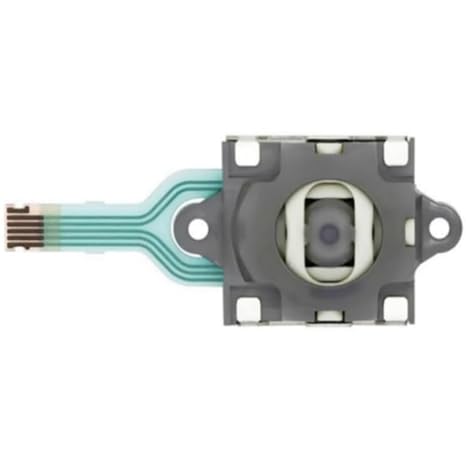
xifaven Joystick Thumb Stick 3D Analog Rod Replacement for ASUS ROG Ally RC71L Console for GPD Win 3 Windows 10 Handheld Game Console Laptop
Item #:
106757645
INR 1642
Price Details
Price
INR 1642
M.R.P. INR 1642
Excluding Shipping & Custom charges ( Shipping and custom charges will be calculated on checkout )
*All items will import from US
0 ratings
Write a review
In stock
 Imported from USA store
QTY:
Order now and get it around Tuesday, July 21
Secured transaction
Ubuy works hard to protect your security and privacy. Our advanced payment security system ensures confidentiality by encrypting your information during transmission using AES (Advanced Encryption Standards) and SSL (Secure Socket Layer) protocols. Your payment details are 100% secure as we do not share your payment details with third party sellers.
Our Top Logistics Partners


If any doubts, please do not hesitate to contact me.

Fast
Shipping

Free
Return*

Secure Packaging

100% Original Products

PCI DSS Compliance

ISO 27001 Certified


Ships from Ubuy, Sold by:
UBNA Distribution LLC
Note: Step Down Voltage Transformer required for using electronics products of US store (110-120). Recommended power converters Buy Now.


What Stands Out
Precision Control
The Xifaven Joystick offers exceptional 3D analog sensitivity, enhancing precision in gaming. Its responsive design ensures smooth navigation, addressing common user frustrations with control accuracy.
Compatibility
Specifically designed for ASUS ROG Ally RC71L and GPD Win 3, this joystick is easy to install. It resolves compatibility issues, making it a perfect choice for players seeking seamless integration with gaming devices.
Durable Design
Built with robust materials, the Xifaven joystick withstands extensive gaming sessions. Its long-lasting durability provides exceptional value, reducing the need for frequent replacements and enhancing the overall gaming experience.
Product Details
| Item Weight | 0.5 lbs (230 grams) |
Who Should Buy?

-
Gaming Enthusiasts
Ideal for avid gamers needing precise control, enhancing gameplay on the ASUS ROG Ally or GPD Win 3.
-
DIY Repairers
Perfect for those skilled in repairing game consoles, providing a reliable replacement for defective analog sticks.
-
Portable Gamers
Great for users frequently on the go, ensuring they have a responsive thumbstick for handheld gaming convenience.

-
Casual Gamers
Not suitable for occasional players who may not utilize advanced features needing joystick replacement.
-
Non-Tech Users
Inadequate for individuals unfamiliar with gaming hardware repair, as installation may require technical skills.
-
Console Exclusivity
Not useful for users of other gaming consoles, as it specifically fits ASUS ROG Ally and GPD Win 3 only.
Product Description
xifaven Joystick Thumb Stick 3D Analog Rod Replacement for ASUS ROG Ally RC71L Console for GPD Win 3 Windows 10 Handheld Game Console Laptop
Have any Query? Chat with us
Customer Questions & Answers
-
Question:
What is the Xifaven Joystick Thumb Stick 3D Analog Rod Replacement?
Answer: The Xifaven Joystick Thumb Stick is a high-quality replacement component designed specifically for the ASUS ROG Ally RC71L console and GPD Win 3 devices. This 3D analog rod replicates the original joystick's functionality, allowing gamers to maintain precision control and optimal performance during gameplay. By replacing a worn-out or malfunctioning stick, users can enhance their gaming experience, ensuring smooth movements and responsiveness. This makes it perfect for avid gamers who rely on accurate controls for competitive or casual play. -
Question:
Is installing the Xifaven joystick difficult?
Answer: Installing the Xifaven Joystick is relatively straightforward, even for those with limited technical skills. It typically involves removing the console's back casing, unfastening the old joystick, and attaching the new analog rod with simple tools. This process allows users to restore their gaming device without extensive technical knowledge, making it accessible for many. Additionally, numerous online guides and video tutorials can help step you through the installation process, ensuring you can quickly enjoy enhanced gameplay. -
Question:
What are the benefits of using the Xifaven joystick replacement?
Answer: Using the Xifaven joystick replacement offers several advantages, including improved gameplay accuracy and responsiveness. Over time, joystick wear can lead to issues like drift or unresponsiveness, negatively affecting gaming performance. By substituting the original with a new Xifaven analog rod, users can restore their devices to optimal condition, ensuring that every movement is precise. This is especially beneficial for competitive gamers looking to maintain a high level of performance during crucial moments in their games. -
Question:
Is the Xifaven joystick compatible with other devices?
Answer: The Xifaven Joystick Thumb Stick is specifically designed for the ASUS ROG Ally RC71L console and GPD Win 3 devices, ensuring a perfect fit and seamless integration. While it may not be compatible with other brands or models, users can easily find alternatives tailored to different systems. When selecting replacement parts, always verify compatibility to avoid any installation issues. This targeted design ensures that users experience optimal performance from the joystick replacement. -
Question:
How can I troubleshoot joystick issues before replacement?
Answer: Before opting for a replacement like the Xifaven joystick, there are a few troubleshooting steps you can take. Begin by recalibrating the joystick through the device’s settings menu, as this can often resolve minor responsiveness problems. Check for any dirt or debris obstructing movement and clean around the joystick base if needed. If issues persist after trying these steps, then considering a replacement may be the next best route to restoring performance and gameplay enjoyment. -
Question:
Will using an aftermarket joystick impact gameplay?
Answer: Using an aftermarket joystick, such as the Xifaven 3D analog rod, is designed to provide an experience similar to the original. High-quality materials ensure that gameplay performance remains consistent, delivering reliable controls and smooth movements. This makes it an excellent choice for gamers who want to maintain high standards in gaming without the cost or hassle of technical issues arising from faulty joysticks. Users can expect no compromise in quality when upgrading with trusted replacements. -
Question:
What tools do I need for installation?
Answer: To install the Xifaven Joystick Thumb Stick, you will typically need a small Phillips screwdriver and possibly a plastic opening tool or tweezers for safe disassembly. These tools help you carefully remove the console casing and replace the joystick without damaging components. Adequate lighting and a clean workspace enhance the installation experience, ensuring that you can see and handle small parts easily. Preparing these beforehand simplifies the process, allowing for efficient installation. -
Question:
Can I use the joystick replacement for mobile games?
Answer: While the Xifaven Joystick is primarily designed for specific handheld gaming consoles like the ASUS ROG Ally and GPD Win 3, it offers improved control for any compatible gaming context. This may include mobile games that can be played on that device. Achieving a personalized gaming setup will enhance your overall experience, engaging you fully in your favorite mobile titles by ensuring precise input and reliability through the joystick replacement. -
Question:
What if the joystick does not respond after replacement?
Answer: If the Xifaven joystick does not respond after installation, check to ensure all connections are secure and that the joystick is properly aligned within the socket. It's also advisable to recalibrate the joystick in the device settings to ensure that it registers inputs correctly. If problems persist, inspecting the installation for any potential errors or revisiting support resources may provide additional solutions. Being attentive during the installation process can prevent many common issues. -
Question:
Where can I buy the Xifaven Joystick Thumb Stick?
Answer: You can purchase the Xifaven Joystick Thumb Stick 3D Analog Rod Replacement for the ASUS ROG Ally RC71L Console and GPD Win 3 from Ubuy. They offer a reliable platform for buying electronic components, ensuring you receive quality products quickly. With a streamlined shopping process, Ubuy makes it easy to find and buy replacement parts tailored to your specific gaming needs, so you can get back to enjoying your favorite games without delay.
xifaven Laptop Replacement Parts Editorial Review
No editorial reviews found
Customer Reviews & Ratings
1 customers ratings
-
5 Star
100%
-
4 Star
0%
-
3 Star
0%
-
2 Star
0%
-
1 Star
0%
Review this product
Share your thoughts with other customers
Platform Trust & Buyer Confidence

PK
Purchase
Verified buyer
“logistcs is very good”
13 June 2026 · via Trustpilot
AN
Akhil
Verified buyer
“Very good and seamless experience, delivery package came in very good condition”
12 June 2026 · via Trustpilot
DK
Dr Kumarasway
Verified buyer
“Heavy import cost and DHL's high delivery fees.”
9 June 2026 · via Trustpilot
JM
J Mama
Verified buyer
“Interesting book and the seller describe it thank you”
8 June 2026 · via Trustpilot
PC
Paritosh
Verified buyer
“Excellent quality and a perfect fit. Description and measurements provided are to the point. Keep them coming more 🤟🏻”
8 June 2026 · via Trustpilot
Secure Checkout
Global Delivery
Easy Returns
Genuine Products
Product Price History
Important information
- Limitations : For products shipped internationally, please note that any manufacturer warranty may not be valid; manufacturer service options may not be available; product manuals, instructions, and safety warnings may not be in destination country languages; the products (and accompanying materials) may not be designed in accordance with destination country standards, specifications, and labeling requirements; and the products may not conform to destination country voltage and other electrical standards (requiring use of an adapter or converter if appropriate). The recipient is responsible for assuring that the product can be lawfully imported to the destination country. When ordering from Ubuy or its affiliates, the recipient is the importer of record and must comply with all laws and regulations of the destination country.
- Not all the products listed on Ubuy are for sale, as Ubuy is a global search engine. Products are subject to export/trade regulations.
INR 1642
Order now and get it around Tuesday, July 21
This item is not restrict in my country.(Please click on above link if this item is not restrict in your country, So our team will review and allow.)
QTY:
Secured transaction
PCI DSS compliant and ISO 27001:2022 certified, with encrypted payments and full buyer protection on every order.
Our Top Logistics Partners
Fastest cross-border delivery
Features & Benefits
- Compatible with ASUS ROG Ally RC71L Console and GPD Win 3.
- High-quality, brand new joystick thumb stick replacement.
- Easy to install with clear visual instructions.
- Satisfaction guaranteed with a full refund policy.
- Perfect for gamers looking to enhance their gaming experience.
- Contact us for any questions or model verification.
Ubuy Assurance
Experience worry-free shopping with 100% original products, PCI DSS-compliant payment security, ISO 27001-certified data protection, the fastest cross-border delivery, free returns *, and secure packaging on every order.