0 ratings

Item #:
92290256
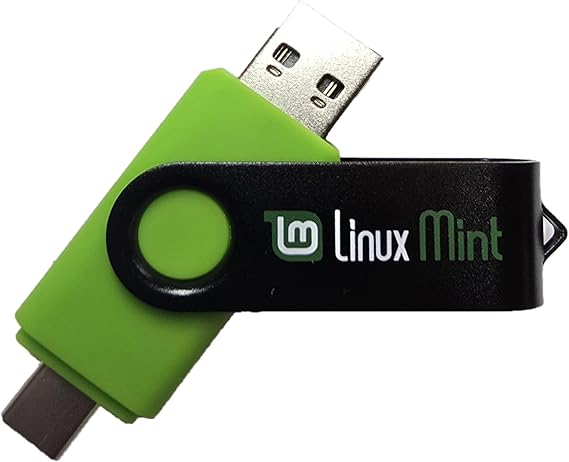
Learn How to Use Linux, Linux Mint Cinnamon 22 Bootable 8GB USB Flash Drive - Includes Boot Repair and Install Guide Now with USB Type C
Item #:
92290256
INR 3152
Price Details
Price
INR 3152
M.R.P. INR 3152
Excluding Shipping & Custom charges ( Shipping and custom charges will be calculated on checkout )
*All items will import from US
0 ratings
Write a review
In stock
 Imported from USA store
QTY:
Order now and get it around Tuesday, September 01
Secured transaction
Ubuy works hard to protect your security and privacy. Our advanced payment security system ensures confidentiality by encrypting your information during transmission using AES (Advanced Encryption Standards) and SSL (Secure Socket Layer) protocols. Your payment details are 100% secure as we do not share your payment details with third party sellers.
Our Top Logistics Partners


This 8 GB USB Flash drive allows you to try and install Linux Mint 22 alongside Windows or fully replace it, complete with support and updates!

Fast
Shipping

Free
Return*

Secure Packaging

100% Original Products

PCI DSS Compliance

ISO 27001 Certified







Ships from Ubuy, Sold by:
UBNA Distribution LLC
Note: Step Down Voltage Transformer required for using electronics products of US store (110-120). Recommended power converters Buy Now.


What Stands Out
Bootable Convenience
Easily boot Linux Mint Cinnamon 22 from an 8GB USB flash drive, providing on-the-go access and installation of a powerful Linux operating system with minimal setup.
Comprehensive Guide
Includes a step-by-step boot repair and installation guide, empowering users to troubleshoot and set up Linux confidently, regardless of their prior experience with operating systems.
USB Type C Support
Designed with USB Type C compatibility, ensuring seamless connectivity with modern devices and enhancing versatility for users with various hardware options.
Product Details
| Memory Storage Capacity | 8 GB |
| Hardware Interface | USB |
| Additional Features | LED Indicator |
| Write Speed | 20 MB/s |
| Read Speed | 20 Megabytes Per Second |
| Connectivity Technology | USB |
| Flash Memory Type | USB |
| Hardware Connectivity Technology | USB Type C |
| Compatible Devices | All modern-day computers, laptops, and desktops |
| Brand | MTN TOOL |
| Manufacturer | Linux Builder |
| Model Number | 74e7848d-87e6-408e-be57-b40a48d914be |
| Color | Green |
| Special Feature | LED Indicator |
| Item Weight | 0.1 lbs (50 grams) |
Who Should Buy?

-
Beginners to Linux
Ideal for those new to Linux who need a straightforward installation and repair guide.
-
Tech Enthusiasts
Perfect for tech-savvy users looking to experiment with Linux Mint in a portable format.
-
Students and Educators
A great resource for learners and teachers needing a practical tool for teaching Linux basics.

-
Advanced Users
Experienced users might find the installation process too basic or lacking in advanced options.
Product Description
Learn How to Use Linux, Linux Mint Cinnamon 22 Bootable 8GB USB Flash Drive - Includes Boot Repair and Install Guide Now with USB Type C
Have any Query? Chat with us
Customer Questions & Answers
-
Question:
What is included with the Linux Mint Cinnamon 22 Bootable USB Flash Drive?
Answer: The Linux Mint Cinnamon 22 Bootable 8GB USB Flash Drive comes preloaded with the Linux Mint operating system, designed for an intuitive user experience. It includes a detailed Boot Repair and Install Guide to help users navigate the installation process smoothly. This drive is particularly beneficial for beginners who want to explore Linux without extensive prior knowledge. With USB Type C compatibility, users can connect it to modern devices effortlessly, making it versatile for various setups. -
Question:
Can I use the Linux Mint Cinnamon USB on different computers?
Answer: Yes, the Linux Mint Cinnamon Bootable USB Flash Drive can be used on multiple computers. Once you plug it into a compatible USB port, you can boot any computer from the drive, provided the system's BIOS supports USB booting. This feature is ideal for users who wish to test Linux Mint on different machines or use it for troubleshooting and recovery tasks. This flexibility makes the drive a valuable tool for both personal and professional use. -
Question:
What is Linux Mint Cinnamon, and why should I use it?
Answer: Linux Mint Cinnamon is a popular, user-friendly Linux distribution based on Ubuntu. It features a sleek, modern interface that is reminiscent of traditional desktop environments, making it easier for new users to transition from Windows or macOS. The Cinnamon desktop offers customization options and a range of pre-installed applications, ensuring a smooth user experience. It's an excellent choice for personal computing, software development, and even light gaming, providing a robust alternative to proprietary operating systems. -
Question:
How does the Boot Repair function work?
Answer: The Boot Repair function included on the USB Flash Drive helps resolve boot issues that may occur when installing or using Linux Mint. This tool analyzes common problems related to the system boot process and provides a simple interface to fix these issues automatically. Users benefit from this feature when encountering boot failures or errors, thereby reducing frustration and downtime while restoring access to their systems. -
Question:
Is the USB Flash Drive compatible with USB Type C devices?
Answer: Yes, the Linux Mint Cinnamon 22 Bootable USB Flash Drive is designed with USB Type C connectivity, making it compatible with a wide range of modern laptops and desktop computers that use USB Type C ports. This ensures users can easily plug and play without needing additional adapters, maximizing the drive's usability across different devices. Whether you're using a new MacBook or a budget laptop, its Type C compatibility is a significant advantage. -
Question:
Can I install other software on the USB Flash Drive?
Answer: While the primary purpose of the Linux Mint Cinnamon USB Flash Drive is to run the Linux operating system, it is possible to install additional software after booting from the drive. However, it is essential to note that changes made to the drive may not be persistent unless you configure it with a persistent storage option. This allows you to keep your installed software and modifications across sessions, making the USB drive more functional for regular use. -
Question:
How can I create a bootable USB drive for Linux Mint?
Answer: To create a bootable USB drive for Linux Mint, you typically need a USB drive (like the one provided) and software such as Rufus or Etcher. However, if you're using the pre-made USB Flash Drive from this product, it is already configured and bootable. Simply plug it into your PC, restart, and set your computer to boot from USB in the BIOS settings. This process allows quick access to Linux Mint without any additional setup. -
Question:
Is support available if I have questions while using Linux Mint?
Answer: Yes, Linux Mint has a vibrant community and extensive online resources where users can seek help and share experiences. Forums, documentation, and tutorials are readily available to address various issues, from installation to troubleshooting. Additionally, the included install guide in the USB Flash Drive offers practical support for beginners, ensuring users can find solutions to most common queries effectively. -
Question:
Can I run Linux Mint alongside another operating system?
Answer: Absolutely! Linux Mint can be installed alongside other operating systems, such as Windows, creating a dual-boot setup. This allows users to choose which OS to boot into at startup. This flexibility is particularly advantageous for those who want to maintain access to their existing files and systems while exploring Linux. The provided Boot Repair tool can assist if any issues arise during the setup process, making transitions smoother. -
Question:
Where can I buy the Linux Mint Cinnamon 22 Bootable USB Flash Drive?
Answer: You can purchase the Learn How to Use Linux, Linux Mint Cinnamon 22 Bootable 8GB USB Flash Drive, including the Boot Repair and Install Guide, from Ubuy in India. Ubuy offers a reliable platform for your technology needs, ensuring you receive a quality product with the necessary support and resources to get started with Linux Mint seamlessly.
MTN TOOL USB Flash Drives 74e7848d-87e6-408e-be57-b40a48d914be Editorial Review
The *Linux Mint Cinnamon 22 Bootable 8GB USB Flash Drive* has elicited mixed responses from its users. Many customers appreciated the convenience of having a pre-made bootable USB drive; however, a significant number expressed frustration with the inadequate instruction booklet that accompanied the product. Some users felt compelled to compile their own guides or rely on external sources, which illuminated the complexities involved in the installation process—especially for those less familiar with operating systems or computer configuration. One of the highlights of the Mint distribution is its friendly Cinnamon desktop environment, which offers a learning curve for those transitioning from Windows, specifically Windows 10. Users noted the ease of installation once they navigated the boot menu, although the exact key to access this menu varied depending on the manufacturer. While some experienced seamless interaction with the software, others reported compatibility issues with specific hardware (like Bluetooth keyboards) and the potential for data loss with a permanent installation. Moreover, while some users find value in the pre-installed applications—such as Firefox, Chrome, and Libre Office—others were disheartened, especially when they encountered problems with audio settings after changing their system’s boot options. Overall, the feedback reflects a product that may serve well for seasoned computer users but could pose significant challenges for novices. As a result, the product is not universally recommended, especially for those lacking technical expertise. **
Customer Reviews & Ratings
1 customers ratings
-
5 Star
100%
-
4 Star
0%
-
3 Star
0%
-
2 Star
0%
-
1 Star
0%
Review this product
Share your thoughts with other customers
Pros
- Convenient pre-made bootable USB drive
- Cinnamon desktop is user-friendly for Windows users
- Includes useful pre-installed applications like Firefox and Libre Office
Cons
- Inadequate instruction booklet; requires external resources for guidance
Platform Trust & Buyer Confidence

PC
Paritosh
Verified buyer
“Quality, fit, and variety are all good. Very good quality, perfect fit, with a good variety in 70s Bellbottom jeans. Keep them coming.”
20-Jul-26 · via Trustpilot
AV
Aggarwal
Verified buyer
“Everything was well maintained and smooth . We can trust UBUY .”
23 July 2026 · via Trustpilot
JM
Jeeju
Verified buyer
“Product is nice. Well packaged and delivered promptly”
23 July 2026 · via Trustpilot
NG
neeraj
Verified buyer
“Product was delivered before time. At each steps remider given time to time ,product is also good and fruitful”
3 July 2026 · via Trustpilot
SP
siva
Verified buyer
“I received the product properly packed and without any damage. If you can provide a video showing how to assemble the parts, it would be a great help. Thanks & Regards, Siva Prakash.”
16-Jul-26 · via Trustpilot
Secure Checkout
Global Delivery
Easy Returns
Genuine Products
Product Price History
Important information
- Limitations : For products shipped internationally, please note that any manufacturer warranty may not be valid; manufacturer service options may not be available; product manuals, instructions, and safety warnings may not be in destination country languages; the products (and accompanying materials) may not be designed in accordance with destination country standards, specifications, and labeling requirements; and the products may not conform to destination country voltage and other electrical standards (requiring use of an adapter or converter if appropriate). The recipient is responsible for assuring that the product can be lawfully imported to the destination country. When ordering from Ubuy or its affiliates, the recipient is the importer of record and must comply with all laws and regulations of the destination country.
- Not all the products listed on Ubuy are for sale, as Ubuy is a global search engine. Products are subject to export/trade regulations.
INR 3152
Order now and get it around Tuesday, September 01
This item is not restrict in my country.(Please click on above link if this item is not restrict in your country, So our team will review and allow.)
QTY:
Secured transaction
PCI DSS compliant and ISO 27001:2022 certified, with encrypted payments and full buyer protection on every order.
Our Top Logistics Partners
Fastest cross-border delivery
Features & Benefits
- Includes 8 GB USB flash drive preloaded with Linux Mint 22 LTS and Boot Repair.
- Run or install Linux Mint alongside your existing OS without any hassles.
- Easy installation with an included guide and 24/7 email support.
- Compatible with all modern computers, laptops, and desktops.
- Lifetime free updates, multilingual support, and essential productivity software.
- Boot repair tool included for troubleshooting and smooth setup.
Ubuy Assurance
Experience worry-free shopping with 100% original products, PCI DSS-compliant payment security, ISO 27001-certified data protection, the fastest cross-border delivery, free returns *, and secure packaging on every order.