- Home Page /
- Industrial Supplies /
- Industrial Electrical /
- Controls & Indicators /
- Industrial Switches /
- Micro Switches /
- Hot-Swap Micro Switch PCB Kit for Logitech G ...
0 ratings


Item #:
89151617
Hot-Swap Micro Switch PCB Kit for Logitech G Pro X Superlight 2 DEX GPW4 Mice ENIG Gold Pads, 6-Claw Clamps | Fix Double-Click & Customize Clicks
Item #:
89151617
INR 2924
Price Details
Price
INR 2924
M.R.P. INR 2924
Excluding Shipping & Custom charges ( Shipping and custom charges will be calculated on checkout )
*All items will import from US
0 ratings
Write a review
In stock
 Imported from USA store
QTY:
Order now and get it around Monday, August 03
Secured transaction
Ubuy works hard to protect your security and privacy. Our advanced payment security system ensures confidentiality by encrypting your information during transmission using AES (Advanced Encryption Standards) and SSL (Secure Socket Layer) protocols. Your payment details are 100% secure as we do not share your payment details with third party sellers.
Our Top Logistics Partners


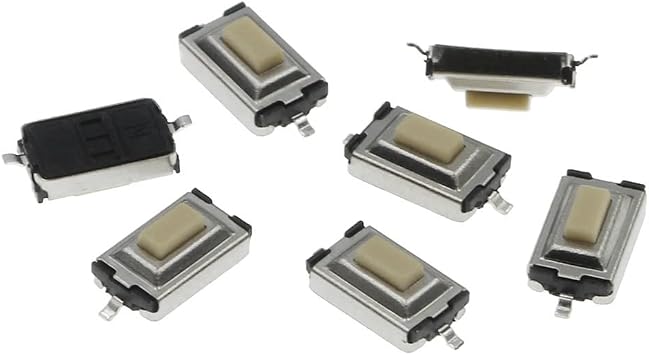
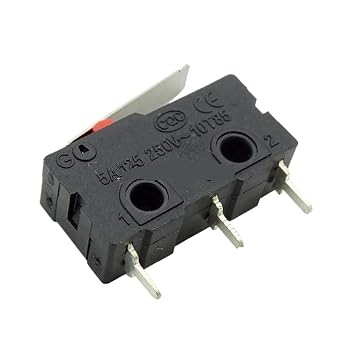
All mechanical micro-motion on the market support direct insertion and extraction.

Fast
Shipping

Free
Return*

Secure Packaging

100% Original Products

PCI DSS Compliance

ISO 27001 Certified


Ships from Ubuy, Sold by:
UBNA Distribution LLC
Note: Step Down Voltage Transformer required for using electronics products of US store (110-120). Recommended power converters Buy Now.


What Stands Out
Hotswap Functionality
Easily replace mechanical micro switches without soldering, allowing for quick repairs and enhanced user customization for Logitech G Pro X Superlight and GPW 2 gaming mice.
Compatibility Design
Specifically designed for Logitech G Pro X Superlight, ensuring seamless integration and optimal performance, making it the go-to DIY repair solution for gamers and tech enthusiasts.
Enhanced Durability
Built with high-quality materials, this PCB board ensures long-lasting performance and reliability, providing users with a superior gaming experience and peace of mind during intense sessions.
Product Details
| Country of Origin | This item will be imported from US |
| Item Weight | 0.5 lbs (230 grams) |
| What is in the box | Hot-Swap Micro Switch PCB... For more details, please check description/product details |
Who Should Buy?

-
DIY Enthusiasts
Perfect for users who enjoy customizing their gaming mouse or repairing components to enhance performance.
-
Gamers
Ideal for competitive gamers who require responsive and reliable buttons for better gameplay experience.
-
Repair Technicians
Useful for technicians who specialize in mouse repairs, making it easier to replace faulty components efficiently.

-
Casual Users
Not suitable for those who casually use their mouse and do not require high-performance modifications.
Product Description
Hot-Swap Micro Switch PCB Kit for Logitech G Pro X Superlight 2 DEX GPW4 Mice ENIG Gold Pads, 6-Claw Clamps | Fix Double-Click & Customize Clicks
Have any Query? Chat with us
Related Searches
Customer Questions & Answers
-
Question:
What is a Mouse HOTSWAP Button PCB Board?
Answer: A Mouse HOTSWAP Button PCB Board is a specialized printed circuit board designed for upgrading or replacing the mechanical micro switches in gaming mice, specifically for models like the Logitech G Pro X Superlight and GPW 2. This board allows for 'hot-swapping' meaning you can easily replace switches without soldering, making repairs and customization straightforward. This is particularly useful for gamers who wish to enhance their mouse's performance or replace worn-out switches without needing extensive technical skills. -
Question:
How do I install the Mouse HOTSWAP Button PCB Board?
Answer: Installing the Mouse HOTSWAP Button PCB Board involves first disassembling your Logitech G Pro X Superlight or GPW 2 mouse. Once opened, carefully remove the existing button switches and disconnect them from the old PCB board. Then, connect the new HOTSWAP PCB in the same way the original was connected. Follow specific guides or tutorials available online for visuals. This DIY approach allows for personal customization of your mouse with different switch types to suit your gaming preferences. -
Question:
What benefits does a HOTSWAP PCB Board provide?
Answer: The main benefit of a HOTSWAP PCB Board is the ease of replacing mechanical switches without soldering. This allows users to tailor their mouse's feel and responsiveness. Gamers can use different switch types for various gameplay styles; for example, using tactile switches for FPS gaming for better feedback. Furthermore, it can extend the life of the mouse, as replacing switches can prevent the need for an entirely new mouse due to switch failure. -
Question:
Can I use any mechanical switches with the HOTSWAP Button PCB Board?
Answer: Not all mechanical switches are compatible with every HOTSWAP Button PCB Board. It is essential to purchase switches that match the specifications of your board, which is designed for specific models like those used in Logitech G Pro X Superlight and GPW 2. Popular options include Kailh and Gateron switches. Always check product compatibility before purchasing to ensure a seamless installation and optimal performance. -
Question:
How do I know if my mouse switch needs replacing?
Answer: Signs that your mouse switch may need replacing include inconsistency in click responsiveness, double-clicking when only a single click is intended, or a noticeably different feeling when actuating the button. If you're an avid gamer, these issues can hinder your performance. Regular maintenance and inspection of the switches can prevent issues and ensure that your gaming experience remains sharp and responsive. -
Question:
Is a DIY repair with a HOTSWAP Button PCB worth it?
Answer: Yes, a DIY repair using a HOTSWAP Button PCB can be a worthwhile investment in both time and resources. If you enjoy customizing your gaming hardware or find that the performance of your mouse needs enhancement, this option allows for extensive personalization. Additionally, it can save you the cost of purchasing a new mouse, extending the life of your existing device while improving its overall feel and functionality tailored to your gaming needs. -
Question:
What tools will I need for the installation process?
Answer: To install the Mouse HOTSWAP Button PCB Board, you will need basic tools such as a Phillips screwdriver for disassembling your mouse, tweezers for handling small components, and possibly a plastic spudger or prying tool to avoid damaging any clips. Having a clean workspace and good lighting will also aid in ensuring you do not lose small parts during the process. These tools make the disassembly and assembly processes much smoother. -
Question:
Can I customize the button feels for different games?
Answer: Absolutely! The beauty of a HOTSWAP Button PCB Board is that it allows you to customize the feel of your mouse buttons to suit different gaming genres. For instance, you might choose lighter switches for games like Overwatch, where rapid clicks are essential, while opting for heavier tactile switches for strategy games where precise feedback is needed. This flexibility enables you to enhance your competitive edge based on gameplay style. -
Question:
Where can I buy the Mouse HOTSWAP Button PCB Board in India?
Answer: You can purchase the Mouse HOTSWAP Button PCB Board for Logitech G Pro X Superlight GPX GPW 2 from Ubuy in India. Ubuy provides a reliable online platform for various tech components including specialty gaming accessories, ensuring you can find the right parts needed for your DIY repair or customization projects. -
Question:
What is the difference between a HOTSWAP PCB and a traditional PCB?
Answer: The primary difference between a HOTSWAP PCB and a traditional PCB lies in the ability to exchange switches without soldering. A HOTSWAP PCB uses sockets that allow you to insert and remove switches easily, which is incredibly useful for customization and maintenance. In contrast, traditional PCBs require soldering, making replacements labor-intensive and technically demanding. Therefore, HOTSWAP PCBs are preferred among gamers who often tweak or maintain their gaming peripherals.
Hokeyio Micro Switches Editorial Review
No editorial reviews found
Customer Reviews & Ratings
1 customers ratings
-
5 Star
100%
-
4 Star
0%
-
3 Star
0%
-
2 Star
0%
-
1 Star
0%
Review this product
Share your thoughts with other customers
Platform Trust & Buyer Confidence

PK
Purchase
Verified buyer
“logistcs is very good”
13 June 2026 · via Trustpilot
AN
Akhil
Verified buyer
“Very good and seamless experience, delivery package came in very good condition”
12 June 2026 · via Trustpilot
DK
Dr Kumarasway
Verified buyer
“Heavy import cost and DHL's high delivery fees.”
9 June 2026 · via Trustpilot
JM
J Mama
Verified buyer
“Interesting book and the seller describe it thank you”
8 June 2026 · via Trustpilot
PC
Paritosh
Verified buyer
“Excellent quality and a perfect fit. Description and measurements provided are to the point. Keep them coming more 🤟🏻”
8 June 2026 · via Trustpilot
Secure Checkout
Global Delivery
Easy Returns
Genuine Products
Top selling Micro Switch PCB Kit in India






Last Updated on Juillet 19, 2026
Product Price History
Important information
- Limitations : For products shipped internationally, please note that any manufacturer warranty may not be valid; manufacturer service options may not be available; product manuals, instructions, and safety warnings may not be in destination country languages; the products (and accompanying materials) may not be designed in accordance with destination country standards, specifications, and labeling requirements; and the products may not conform to destination country voltage and other electrical standards (requiring use of an adapter or converter if appropriate). The recipient is responsible for assuring that the product can be lawfully imported to the destination country. When ordering from Ubuy or its affiliates, the recipient is the importer of record and must comply with all laws and regulations of the destination country.
- Not all the products listed on Ubuy are for sale, as Ubuy is a global search engine. Products are subject to export/trade regulations.
INR 2924
Order now and get it around Monday, August 03
This item is not restrict in my country.(Please click on above link if this item is not restrict in your country, So our team will review and allow.)
QTY:
Secured transaction
PCI DSS compliant and ISO 27001:2022 certified, with encrypted payments and full buyer protection on every order.
Our Top Logistics Partners
Fastest cross-border delivery
Features & Benefits
- Transform your Logitech G Pro Wireless mouse with full hot-swappable capabilities.
- Features a state-of-the-art 0.8mm thick microplate designed for seamless installation.
- Includes all necessary components like a TTC encoder and micro switches for easy replacement.
- Comes with a magnetic screwdriver and video tutorials for hassle-free DIY upgrades.
- No need to worry about micro-motion problems with flat installation technology.
- Compatible with all three-leg micro switches on the market for convenient upgrades.
Ubuy Assurance
Experience worry-free shopping with 100% original products, PCI DSS-compliant payment security, ISO 27001-certified data protection, the fastest cross-border delivery, free returns *, and secure packaging on every order.